I Built a Spritesheet Tool (Now Live!)
There are moments in a lot of projects where you realize:
I am solving the same little thing, over and over.
For me, that problem has always been spritesheets.
Huge spritesheets.
Weird padding.
Offsets.
Non-matching sizing.
Check the last tile's coordinates. Count over two tiles, down four.
Was that tile (12,7) or (13,7)?
Crap. I need raw pixel coordinates.
Multiply by tile size.
Account for padding.
Try again.
Repeat.
I also realized something else: for most of these massive sheets, I’m using maybe 1% of the tiles. The file size might not be huge, but it still got me thinking about how much waste there is — both in bandwidth and in mental overhead.
I decided to build the tool I wanted.
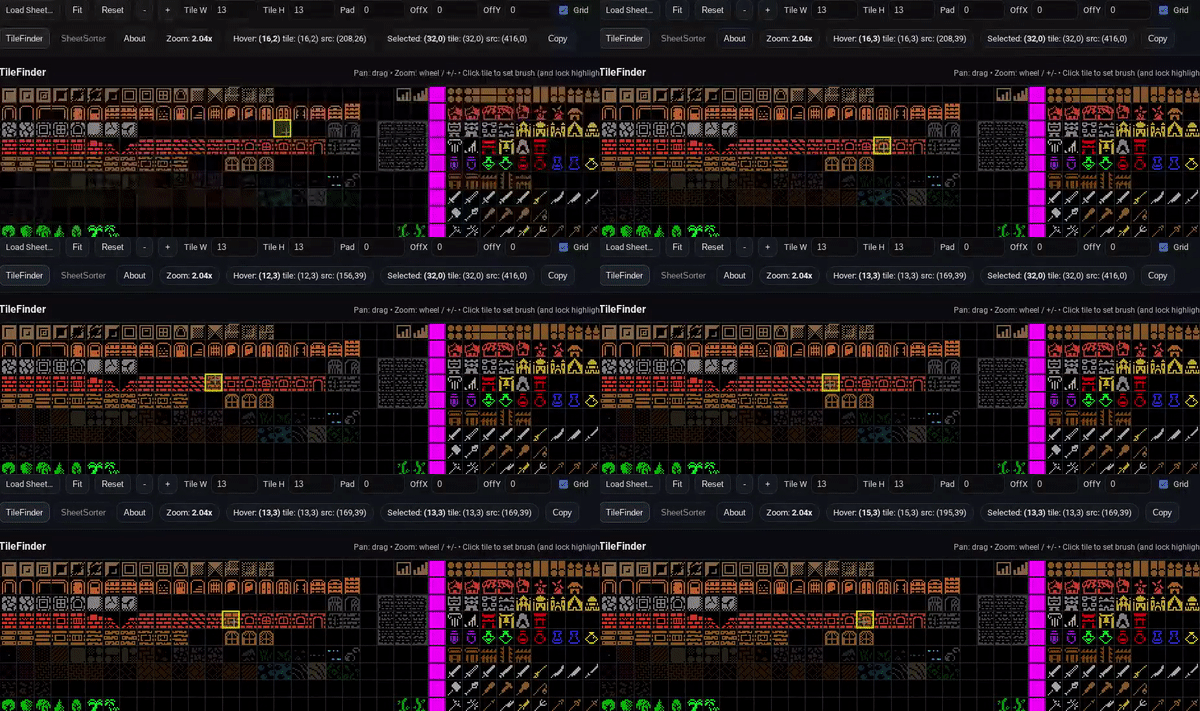
SheetSorter (v1.0.0 Free)
I’ve launched a small utility called SheetSorter.
The first feature set — TileFinder — helps you:
- Inspect large spritesheets
- Handle padding and offsets
- Zoom and pan cleanly
- Copy tile coordinates
- Copy raw pixel source coordinates
No installs.
No accounts.
It runs in your browser (and can be installed as a PWA if you want).
If you’ve ever wrestled a giant spritesheet and just wanted clean coordinates without doing math in your head, this is for you.
Try it here:
👉 sheetsorter.sleighterror.com
What’s Next
This is just the foundation.
The next step (and honestly the part I’m excited about) is the full SheetSorter workflow layer:
- Select only the tiles you need
- Assemble a new optimized sheet
- Export PNG
- Export JSON manifest
- Attach metadata to tiles
Because if I’m using 20 tiles out of 500, I’d rather ship 20.
If you try it and have feedback, I’m listening.